
YouTube lets users upload videos in different formats and resolutions. Starting from the basic – 144p which is perfect for very slow internet connection and ending with 8K which is the most complex one. Understanding available video formats and resolutions is essential for the selection of the right format depending on your device, internet speed and data plan. In addition to that, this knowledge is crucial for YouTubers who should understand how to upload their videos in the appropriate format.
What is Video Resolution?
Video resolution is the number of pixels shown on your screen. The higher the number of pixels – the sharper the image becomes. Video resolution is defined by the number of horizontal lines of pixels. It might look like 720p, 1080p or 2160p. The “p” in the notation above refers to progressive scan meaning the sequential rendering of frames.
Resolution List for YouTube
- 144p – it is the lowest resolution and it results in blurry image but takes a lot of data. This resolution might be used only when it is impossible to view any other video due to your internet speed.
- 240p – it is a little bit better than the previous one but it is still low. It might be used when the video includes audio content and the visual aspect is not crucial.
- 360p – it is the standard resolution. It is perfect for small screens of phones and for a limited amount of data.
- 480p (SD) – standard definition. It is a good picture and the minimum required resolution for comfortable viewing.
- 720p (HD) – high definition. Sharpness of picture is great with this resolution. It might be used for most of the screens of phones and for moderate internet connection.
- 1080p (Full HD) – full high definition. Sharp and clear picture is the key characteristic of this resolution. It is good to use as the standard resolution.
- 1440p (2K QHD) – quad high definition. The picture includes more details than 1080p resolution.
- 2160p (4K UHD) – ultra high definition. Unbelievable clarity. It is great to use for big screens and for devices which are capable of showing 4K resolution.
- 4320p (8K) – it is the highest resolution you might find on YouTube. At the moment it is available for a few videos only and requires powerful hardware.
Codecs Used by YouTube
It defines the way of video compression and transferring it to your device.
- VP9 – the primary codec for HD and higher resolution videos on YouTube. Efficient encoding with great picture quality.
- AV1 – it is more efficient than VP9 codec and provides great quality with lower bitrate. It gradually replaces VP9 on YouTube.
- H.264 – old codec which is used when there is no opportunity to use VP9 or AV1 codecs. It is less efficient but compatible everywhere.
List of Available Frame Rates
- 24fps – cinematic frame rate used for films.
- 30fps – standard frame rate used for most of the videos on YouTube. Nice smooth playback.
- 60fps – high frame rate. Smooth motion is guaranteed. Perfect for gaming videos and other fast-paced content.
How to Set Correct Quality with YouTube Vanced
YouTube Vanced enables setting up the preferred quality in the way impossible to do with the official app. With Vanced you are able to set the particular resolution as default for Wi-Fi and mobile data separately. With Vanced you can watch HDR videos in full brightness and YouTube won’t reduce video quality on its own with the resolution override.
In combination with Vanced MicroG account sync your quality settings will be preserved for all the sessions. Once you set it – all videos will be played with these quality settings.
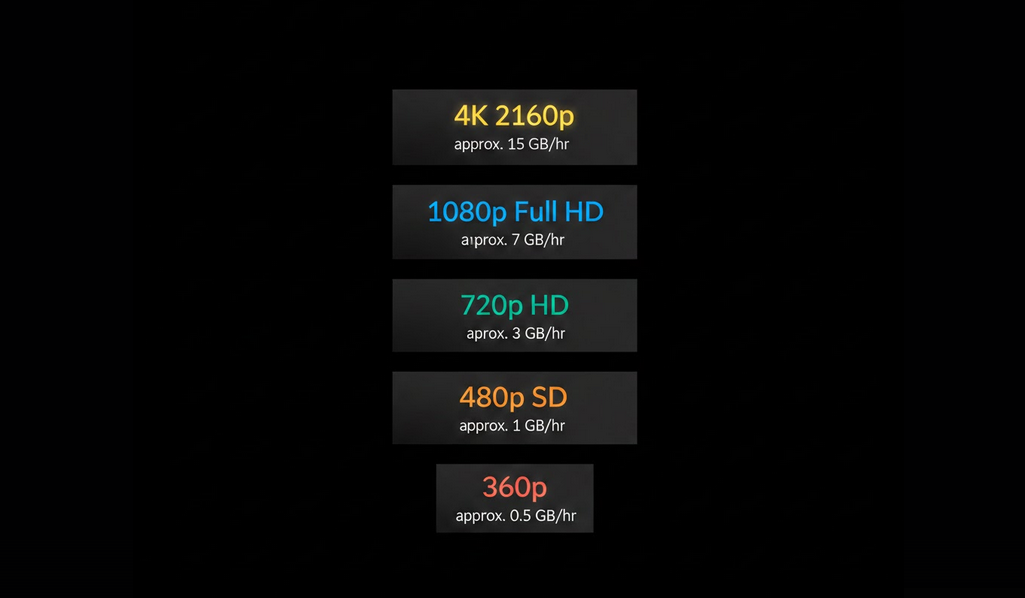
Amount of Data Used for Video Playback
- 360p – about 150 to 350 MB per hour.
- 480p – about 350 to 700 MB per hour.
- 720p – about 700 MB to 1.5 GB per hour.
- 1080p – about 1.5 to 3 GB per hour.
- 1440p – about 3 to 5 GB per hour.
- 2160p (4K) – about 5 to 7 GB per hour or even more depending on the content.
Optimal Resolution for Your Setup
- Small Phone Screen – 720p will provide you nice visuals without wasting unnecessary data.
- Big Phone/Tablet – 1080p will provide you the full clarity with bigger screens.
- Desktop or Smart TV – 1440p or 4K to use the full potential of big screens and high resolution.
- Limited Data Plan – 480p or 360p to save data while comfortably watching videos.
- Audio Only Videos – the lowest available resolution to save data.
Who Will Benefit from This Information?
People Who Want Nice Picture Quality on Their Specific Device.
Users with Limited Bandwidth/Data Caps.
YouTubers Who Want to Upload Their Videos in the Correct Format.
Technically Inclined People.
Conclusion
Knowledge about video formats and resolutions will bring you maximum comfort while watching YouTube videos on your specific device.
